



Description
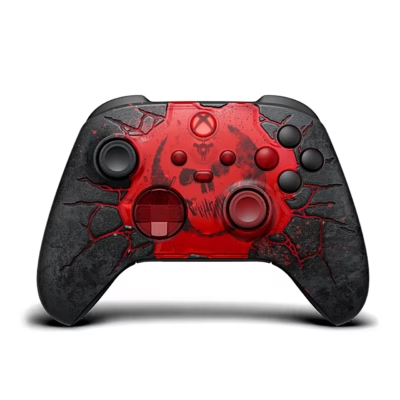
Red Xbox Wireless Controller with Bluetooth – Microsoft QAU-00012
The Microsoft Xbox Wireless Controller Red (QAU-00012) offers a modern gaming experience, combining an ergonomic design, wide cross-platform compatibility and reliable performance. This gamepad works with Xbox Series X/S, Xbox One and Windows PC, as well as iOS and Android platforms. The two-tone red and white finish and textured surface provide a secure grip and a striking look, both at home and on the go.
Key features
- Wireless connection: Supports both Bluetooth and Xbox Wireless (simple, quick pairing with different devices)
- Ergonomic design: Textured grip surfaces and a comfortable shape keep it comfortable to use during longer gaming sessions
- New hybrid D-pad: Improved precision and responsiveness in all game genres
- Share button: Lets you quickly record and share gaming moments
- 3.5 mm headphone jack and combined mic port: Compatible with standard headphones and headsets
- 40-hour battery life: Two AA batteries are included, so you can start playing straight away
- Cross-platform support: Works with Xbox Series X/S, Xbox One, Windows 10/11, Android and iOS
- Everything you need included: The controller and 2 AA batteries are included; a USB cable and accessories are sold separately if needed
Technical specifications
- Maximum battery life: up to 40 hours (with 2 x AA batteries)
- Number and type of batteries: 2 x AA (included)
- Connectivity: Bluetooth, Xbox Wireless, 3.5 mm headphone jack
- Dimensions: 170 × 70 × 177 mm (controller); packaging: 177 × 180 × 72 mm
- Weight: 222 g (controller), packaging 540 g
- Buttons: D-pad, Share button, bumpers, analogue sticks, ABXY
- Gaming control technology: Analogue/digital
- Platform support: Xbox Series S, Xbox Series X, Xbox One, Windows 10/11, PC, Android, iOS
- Manufacturer: Microsoft
- Product codes: EAN: 196388518203 | QAU-00012
User guide
The controller connects to the console wirelessly (Xbox Wireless) or via Bluetooth to another device (PC, mobile). Start the controller’s pairing mode by holding the relevant button, then select “Xbox Wireless Controller” on the device. Insert the batteries and, if needed, download the Xbox Accessories app to customise buttons or settings. For maintenance, clean the surface with a dry, soft cloth and avoid liquids getting into the electronics.
To use headphones, plug them directly into the controller’s 3.5 mm socket. Software updates can be carried out through the Xbox or PC app. High-quality construction and tests that meet Microsoft standards ensure a longer service life. The product comes with Microsoft support if needed.










































Reviews
There are no reviews yet.