



Description
Cable signal digibox with HDMI or SCART connection
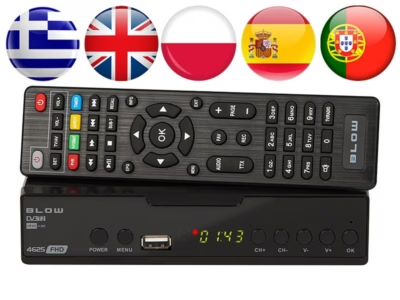
The Esperanza EV107R is a digibox for receiving cable signal, which connects to the TV via HDMI or SCART. It suits you if you want to add a tuner to your TV and control channel viewing and settings with the remote included in the set. PVR and timeshift help you record TV content, and pause viewing and resume it later. The choice of audio outputs and video support makes the device suitable for setting up both picture and sound according to your system.
Main features
- Cable signal, designed for receiving TV signal via cable.
- Analogue and digital tuner, allowing both analogue and digital reception.
- PVR and timeshift, the option to record and pause for more convenient viewing.
- 1 × HDMI and 1 × SCART, connection option for both newer and older TVs.
- 1 × USB 2.0, option to connect an additional device.
- Digital coaxial audio output, easier to connect to an external sound system.
- Dolby Digital Plus audio decoder, suitable for playing back content with compatible sound.
- Power consumption 6 W, 0.5 W in standby, lower energy use in standby mode.
Connections, video and audio
The Esperanza EV107R offers 1 × HDMI, 1 × SCART and 1 × USB 2.0 ports for connections, as well as 1 × digital coaxial audio output. Aspect ratios 4:3 and 16:9 are supported, as are video modes 576i, 576p, 720p, 1080i and 1080p. Supported video formats include MPEG2, MPEG4, AVC, H.264 and HEVC/H.265.
Functions and compatibility
The device has a PVR function and timeshift, which give you more control over viewing TV content. The digibox is designed for cable signal and has an analogue and digital tuner. A remote control is included for operation.
If you use external speakers or an amplifier, you can send the sound out via the digital coaxial audio output. To transmit the picture to the TV, you can choose HDMI or SCART connection, depending on which inputs your TV has.
Installation and use
Connect the digibox to the TV with an HDMI or SCART cable and plug the device into the mains. If needed, connect an external audio device to the digital coaxial audio output to transmit sound. Then use the remote included to select channels and settings, and select the corresponding input (HDMI or SCART) on the TV so the picture is displayed.
Included in the box
- Esperanza EV107R digibox
- Remote control
- Power cable (AC)
Why choose the Esperanza EV107R?
The Esperanza EV107R combines cable signal reception, versatile connections, and PVR and timeshift functions in one device. HDMI and SCART give flexibility when connecting the TV, and via the digital coaxial audio output you can add an external sound system if needed. It is a simple way to add a tuner and control TV viewing more conveniently.














































Reviews
There are no reviews yet.