


Description
Sonoff NSPanel smart wall controller – control your whole home with one touch
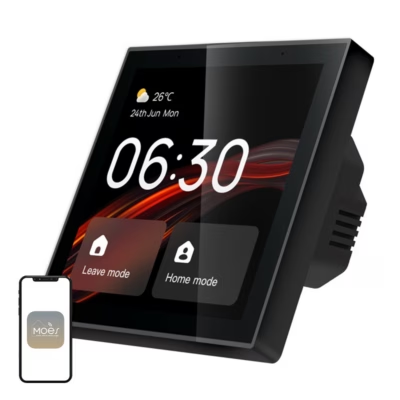
The Sonoff NSPanel smart wall controller makes managing smart home devices simple and convenient. The touch-sensitive HMI (Human Machine Interface) wall panel with a screen lets you quickly activate various scenes, view the weather in real time, control devices, and adjust lighting and temperature. With two physical buttons you can quickly switch lights and other important electrical devices on or off.

Full control of lighting and climate with a smart control panel
The NSPanel lets you easily adjust connected lights and LED strips, and also change light intensity and colour temperature. The built-in temperature sensor measures the room air temperature, and according to it the thermostat switches the heating or cooling device linked to the same eWeLink account, for example a relay installed at the boiler or a floor heating valve. In automatic mode you can set up to six time periods with different temperatures per day.

Smart scenes and device groups for a smart home
The touch panel supports creating versatile scenes and allows scheduling device operating times. For example, you can set the bedroom light to switch off automatically at night, or the heating to switch on before you get home. The NSPanel smart wall controller supports up to 8 different widgets and lets you group devices so you can control either all lights at once or only the devices in a specific room.

Control with the app and voice commands
The NSPanel connects over Wi-Fi to the eWeLink app (Android, iOS), which lets you control your devices remotely too, for example while travelling. The panel also supports the Google Assistant, Amazon Alexa, Apple Siri and Alice voice assistants, so you can control lights or climate devices simply by voice.

Real-time weather information and wide compatibility
The touch panel displays in real time the indoor temperature, the outdoor temperature and the local weather forecast (sunny, cloudy, rainy). The device is compatible with most Sonoff devices and selected Philips Hue products, including switches, plugs, lamps and LED strips.

What the panel needs and what works without internet
The thermostat and screen widgets work through the eWeLink cloud service, so they need a 2.4 GHz Wi-Fi network with an internet connection and an eWeLink account. Without internet, the NSPanel works as a standard wall switch: two buttons switch the relays, and on the same router’s local network the relays can be switched on and off from the app.
The temperature is measured by the panel’s built-in sensor from the room air, so the thermostat also controls floor heating according to the air temperature. The panel is installed in the wall box by an electrician.
Technical data
| Brand | Sonoff |
|---|---|
| Model | NSPanel-EU |
| Input | 100–240 V ~ 50/60Hz, 4A max. |
| Output | 100–240 V ~ 50/60Hz, 2A/channel, 4A total |
| Maximum load | 480 W (2 A) per channel, 960 W (4 A) total |
| Temperature sensor | built-in, measures room air |
| LED load | 150 W 110 V/channel, 300 W 110 V total |
| Wi-Fi | IEEE 802.11 b/g/n 2.4GHz |
| Bluetooth | 4.2 BLE |
| Display | 3.5″ TFT, 480×320 px |
| Compatibility | Android, iOS |
| Housing | PC V0 + CRS + tempered glass |
| Dimensions | 86 × 86 × 41.7 mm |
| Certificates | CE, CQC, SRRC, RoHS |
Included in the package
- NSPanel control panel
- 2 screws
- User manual











































Reviews
There are no reviews yet.