


Description
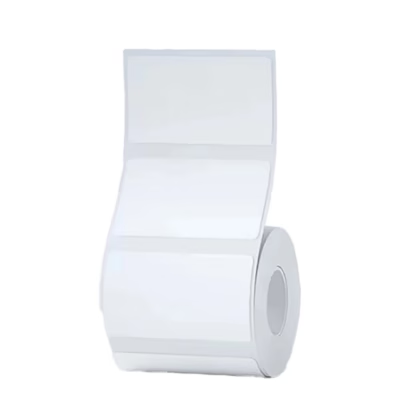
Niimbot M2 series thermal stickers 50 x 30 mm silver 225 pcs per roll: visible and consistent labelling for everyday work
If you need to label prices, dates or codes quickly and correctly, the silver thermal labels made for the Niimbot M2 series offer a practical solution. Each label measures 50 x 30 mm and the roll holds 225 labels in total, which comfortably covers the repeated labelling jobs of a shop, a warehouse and small-scale production alike. Direct thermal printing means that no ink or toner is needed and the work is even and economical.
Main features
- Compatibility with Niimbot M2 series thermal printers ensures reliable work without extra setup.
- The size 50 x 30 mm suits price tags, best-before dates and serial numbers on a shelf and on packaging alike.
- 225 pcs per roll reduces how often rolls need changing and keeps work uninterrupted.
- The silver surface brings out the information well and helps the labels stand out from other markings.
- Direct thermal printing needs no ink or cartridges, which simplifies maintenance and reduces costs.
- Easy handling: loading the roll is quick and the labels run smoothly.
- Wide use: prices, best-before dates, emoticons, serial numbers and other short texts.
- The model ES50*30-225 helps identify the right roll and manage stock.

Thermal labels Niimbot 50 x 30 mm, 225 pcs per roll, silver
The set includes a roll that allows you to print 225 silver labels measuring 50 x 30 mm. It is made for Niimbot M2 series thermal printers. Suitable for printing price tags, best-before dates, emoticons, serial numbers and similar information, so that work stays clear and organised every day.
Compatibility, use and care
The roll is designed for use in Niimbot M2 series thermal printers. The manufacturer does not confirm compatibility with other models, so we recommend using this roll only with M2 series devices. Direct thermal printing needs no ink or cartridges, which makes use easy and keeps running costs under control.
For the best result, apply the labels to a clean and dry surface. Keep the roll in its original packaging in a dry, cool place protected from direct sunlight, to preserve the quality of the printable surface throughout its service life.
Installation and usage instructions in the Niimbot M2 printer
Open the printer cover and place the roll in the holder so that the labels run forward evenly. Close the cover and switch the device on. Connect the printer to the Niimbot app, choose the label format 50 x 30 mm and, if necessary, carry out a calibration to detect the gaps between the labels. Create a design in the app, set the darkness and speed according to the result of the test print and print one label as a test. Before starting mass work, make sure that the information is legible and that the layout suits the intended use.
Included
- 1 x Niimbot ES50*30-225 label roll
- 225 labels measuring 50 x 30 mm, colour silver
Ready to order
Order silver 50 x 30 mm thermal labels for the Niimbot M2 series printer and achieve correct and repeatable labelling quality without ink and toner. A roll capacity of 225 pcs helps keep work consistent and reduce downtime, so that everyday labelling runs smoothly.










































Reviews
There are no reviews yet.