


Description
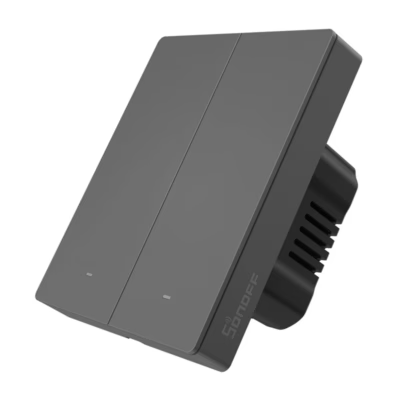
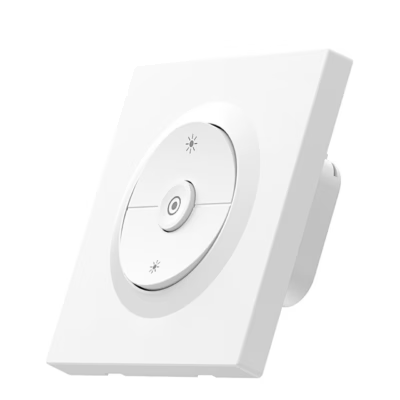
The Avatto TS20-EU-W2 WiFi touch light switch, 2-gang, for convenient smart lighting control
If you want to manage the lights of your home conveniently, the Avatto TS20-EU-W2 WiFi touch light switch does it reliably. Switch the light on or off from the touch panel, from the app or with voice commands, and put together routines that fit your daily plan. The 2-gang solution controls two circuits, for example the main light of a living room and wall lamps, and works on a 2.4 GHz network with the Tuya Smart or Smart Life ecosystem.
Main features
- 2-gang control lets you manage two separate lighting circuits safely and conveniently from one switch, reducing the need for additional switches.
- Several control methods: a touch panel, a mobile app and voice control through Alexa or Google Home give flexibility for every situation.
- Schedules and timer: weekly schedules and a 1-60 minute timer help automate everyday actions and reduce needless burning time.
- Random mode creates the impression of being at home when you are away, which can reduce unwanted attention.
- Backlight dimming: the brightness of the LED indicators can be reduced or they can be switched off for the night so that the light does not disturb sleep.
- Interaction in the smart home: Smart Scene Linkage ties the switch to motion sensors, curtains and other Tuya devices so that the light comes on or goes out automatically.
- Power failure memory restores the last state after power returns, so that the lights are in the same state as before the interruption.
- Durable front panel: tempered glass and V0 flame-retardant PC plastic ensure durability and a clean look.

Avatto TS20-EU-W2 WiFi touch light switch
The Avatto TS20-EU-W2 is a touch switch whose light you can control from the app, with voice commands or directly from the panel. The WiFi connection and compatibility with the Tuya Smart, Smart Life, Google Home and Alexa platforms make managing the lighting of your home simple every day.

Several control methods
The touch panel reacts quickly and the LED indicators show the active channels in the dark too. The backlight can, as you wish, be dimmed or switched off completely. With the Tuya or Smart Life app you can switch the lights on and off from anywhere and use voice control through Alexa and Google Home.

Scheduling and planning
Set weekly schedules so that the lights switch automatically at fixed times, for example in the kitchen in the mornings or in the hallway in the evenings. The timer lets you switch the lights off automatically after 1-60 minutes, and the random mode gives the impression that someone is at home when you are away yourself.

Works together with other devices
Connect the switch with motion sensors, curtains or other smart home devices. With Smart Scene Linkage the light can come on when you approach and go out when you leave the room.

Remembers settings
Power Failure Memory preserves the last state, so that after power is restored the lights stay in the same state as before the interruption.
Compatibility and use in a smart home
The switch works on a 2.4 GHz WiFi network and can be controlled with the Avatto, Tuya Smart or Smart Life app. Voice control is supported through Amazon Alexa and Google Home. The 2-gang construction suits two lighting circuits, for example the main light and accent lights.
The power supply is AC 100-240 V with a rated current of up to 10 A. If you plan to connect several light sources with the switch, make sure the load stays within the permitted limits. If necessary, group the light fittings in the app through a scene to get the desired result without overloading.
The device works directly on a WiFi network and a separate smart hub is not needed. For care, wipe the front panel with a soft cloth that is dry or slightly damp and avoid abrasive cleaning agents. Firmware updates can be made through the app if the manufacturer offers them.
Installation and first setup
Before installation, switch the power off completely at the fuse board and make sure it is de-energised. Follow the connection diagram that comes with the product and, if necessary, turn to a qualified electrician. Connect the input and the outputs according to the two channels, then fix the switch to the wall and restore the power.
For pairing with the app, download the Tuya Smart, Smart Life or Avatto app and connect the switch to your home network in the 2.4 GHz frequency band. Give the device a name, room and channel labels and create schedules, timers and scenes. If you wish, adjust the brightness of the LED backlight or switch it off in night mode.
In the set
The set contains everything for the first installation and setup.
- Avatto TS20-EU-W2 touch 2-gang WiFi light switch
- Fixing screws
- Short user guide
Choose smart and well-thought-out light control
The Avatto TS20-EU-W2 helps create working routines and reduce needless burning time thanks to schedules, the timer and power failure memory. Compatibility with the Tuya ecosystem and voice control makes use flexible both at home and when you are away. If you are looking for a simple way to control two lighting circuits in one body, this switch is a practical choice.












































Reviews
There are no reviews yet.