

Portable monitors
Portable monitor: size, resolution and connection
A portable monitor is a thin 13-18 inch second screen that you can carry in a bag and connect to a laptop, phone or games console. The range includes Arzopa and Uperfect monitors. The purchase is decided by screen size, resolution and whether your device sends the picture over USB-C.
Screen diagonal: 14, 15.6 or 16 inches
A 14-inch monitor weighs about 0.5-0.8 kg and fits in the same bag as a laptop. A 15.6- or 16-inch screen works well on a desk as a second work screen, to keep two windows side by side. If you choose the size to match your laptop screen, the text is the same size on both screens.
Resolution and aspect ratio
Full HD (1920 × 1080) is the most common on portable monitors and gives sharp text at 14-15.6 inches. QHD+ (2560 × 1600) and WUXGA (1920 × 1200) have a 16:10 aspect ratio, so more rows of a document or spreadsheet fit on the screen. 4K Ultra HD suits photo and video editing.
Panel: IPS or OLED
An IPS panel shows colours evenly up to a 178° viewing angle. Most portable monitors have an IPS panel. An OLED panel has deep black and high contrast, which suits watching films and picture work.
Connection: USB-C or mini HDMI
With a single USB-C cable the monitor gets both picture and power, if the USB-C port of your laptop or phone supports picture output (DisplayPort Alt Mode or Thunderbolt). A games console and an older computer connect through mini HDMI, and the power then comes separately from a USB-C charger. You will find cables and stands on the Accessories for monitors page. For a larger desk monitor, see the Computer monitors page.
Frequently asked questions
Connect the monitor with a USB-C cable to a USB-C port on the laptop that carries the monitor or Thunderbolt symbol. If the port only carries data, connect with a mini HDMI cable and supply power from a charger. Then, in Windows or macOS display settings, choose whether the screen extends or duplicates the picture.
Yes, if the phone’s USB-C port supports picture output. For example, Samsung Galaxy phones in DeX mode and iPhone 15 and newer work this way. With a touchscreen monitor you can then control it with your finger.
A games console connects through mini HDMI with a cable that has HDMI at one end and mini HDMI at the other. The power comes from a USB-C charger, because the console’s HDMI port only carries picture and sound.
Usually the reason is that the USB-C port or cable used carries only data or power. Try the supplied cable, another USB-C port, or a mini HDMI connection with additional power.
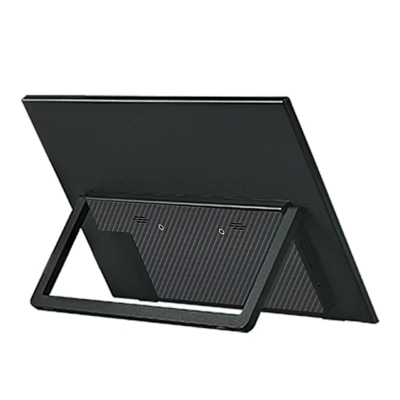
Many portable monitors have built-in speakers. The stand is either the supplied case or a leg on the back. You can find models with speakers using the Features filter.
-
219,95 €
- Screen diagonal
- 16"
- Resolution
- WUXGA (1920 × 1200)
- Features
- Built-in speakers, Touchscreen
-
145,95 €
- Screen diagonal
- 15.6"
- Resolution
- Full HD (1920 × 1080)
- Features
- Built-in speakers, Touchscreen
-
131,95 €
- Screen diagonal
- 16"
- Resolution
- Full HD (1920 × 1080)
-
153,95 €
- Screen diagonal
- 16"
- Resolution
- WUXGA (1920 × 1200)
- Features
- Built-in speakers
-
131,95 €
- Screen diagonal
- 16"
- Resolution
- WUXGA (1920 × 1200)
- Features
- Built-in speakers
-
194,95 €
- Screen diagonal
- 23.8"
- Resolution
- Full HD (1920 × 1080)
- Features
- Built-in speakers
-
146,95 €
- Screen diagonal
- 15.6"
- Resolution
- Full HD (1920 × 1080)
- Features
- Built-in speakers, Touchscreen
-
133,95 €
- Screen diagonal
- 16"
- Resolution
- WUXGA (1920 × 1200)
- Features
- Built-in speakers
-
145,95 €
- Screen diagonal
- 16"
- Resolution
- WUXGA (1920 × 1200)
- Features
- Built-in speakers
-
131,95 €
- Screen diagonal
- 15.6"
- Resolution
- Full HD (1920 × 1080)
- Features
- Touchscreen
-
231,95 €
- Screen diagonal
- 13.3"
- Resolution
- Full HD (1920 × 1080)
- Features
- Touchscreen
-
146,95 €
- Screen diagonal
- 18.5"
- Resolution
- Full HD (1920 × 1080)
- Features
- Built-in speakers
-
146,95 €
- Screen diagonal
- 16"
- Resolution
- QHD+ (2560 × 1600)
- Features
- Built-in speakers
-
109,95 €
- Screen diagonal
- 16"
- Resolution
- WUXGA (1920 × 1200)
- Features
- Built-in speakers
-
94,95 €
- Screen diagonal
- 16"
- Resolution
- WUXGA (1920 × 1200)
- Features
- Built-in speakers
-
85,95 €
- Screen diagonal
- 16"
- Resolution
- WUXGA (1920 × 1200)
- Features
- Built-in speakers
-
116,95 €
- Screen diagonal
- 15.6"
- Resolution
- Full HD (1920 × 1080)
- Features
- Built-in speakers, Touchscreen
-
109,95 €
- Screen diagonal
- 14"
- Features
- Touchscreen
-
92,95 €
- Screen diagonal
- 14"
- Resolution
- WUXGA (1920 × 1200)
- Features
- Built-in speakers
-
97,95 €
- Screen diagonal
- 14"
- Resolution
- WUXGA (1920 × 1200)
- Features
- Built-in speakers
-
111,95 €
- Screen diagonal
- 14"
- Resolution
- Full HD (1920 × 1080)
- Features
- Built-in speakers, Touchscreen
-
89,95 €
- Screen diagonal
- 15.6"
- Resolution
- Full HD (1920 × 1080)
-
97,95 €
- Screen diagonal
- 15.6"
- Resolution
- Full HD (1920 × 1080)
-
97,95 €
- Screen diagonal
- 15.6"
- Resolution
- Full HD (1920 × 1080)
- Features
- Built-in speakers
All products shown.
Best sellers
-
184,95 €
- Screen diagonal
- 14"
- Resolution
- QHD+ (2560 × 1600)
-
145,95 €
- Screen diagonal
- 15.6"
- Resolution
- Full HD (1920 × 1080)
- Features
- Built-in speakers, Touchscreen

































