


Description
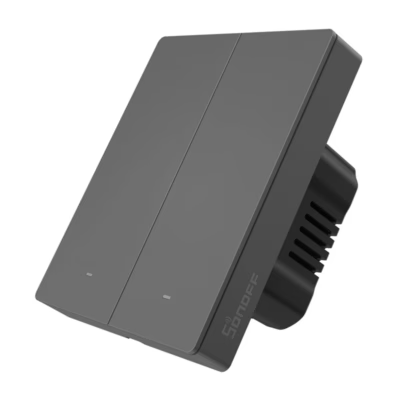
The Avatto TS60-EU-W2 Wi-Fi smart double light switch brings two-circuit light control into one touch solution
If you want to control the light both from the wall and from a phone, the Avatto TS60-EU-W2 Wi-Fi smart double light switch is a practical choice. The device connects to the home network and lets you create schedules and scenes, so that the light is at the right time where it is needed. Two independent channels suit rooms with two independent circuits or multi-point lighting, and control in the Smart Life or Tuya Smart app makes use flexible at home, in the office and when travelling.
Main features
- Two-circuit control lets you switch two light groups on and off separately and adapt the lighting more precisely for different activities.
- Wi-Fi 2.4 GHz operation without a separate central unit and remote control from the app anywhere there is an internet connection.
- Schedules and automation in the Smart Life or Tuya Smart app help reduce excess energy use and make light use routine.
- Voice control works through popular voice assistants, so you can switch the light on or off on command.
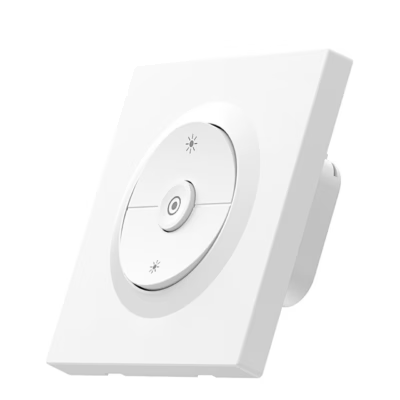
- The LED backlight helps you find the switch easily in the dark, and the touch white 80 × 80 mm panel fits different interiors.
- 800 W per circuit and up to 10 A ensure a sufficient power reserve for ordinary resistive loads when the connections are made according to the guide.
- Standby consumption of 0.1 mA means very low energy use when the switch is not actively working.

Avatto TS60-EU-W2 smart light switch
The Avatto TS60-EU-W2 is a smart two-channel touch switch with which you can control the lights both in the traditional way from the wall and with a mobile app. A 2.4 GHz Wi-Fi connection is enough for access to be everywhere the internet works. The switch supports two independent electrical circuits, which suits rooms with multi-point lighting well. The compact smart touch switch helps bring everyday control into one clear solution.

Easy installation and setup
Installation does not require complex know-how. Connect the wires according to the enclosed diagram and link the device with the Smart Life or Tuya Smart app. Pairing is a quick process. Hold the button for about 5 seconds until the backlight starts to blink, which indicates setup mode. After that the Smart Life or Tuya Smart app finds the switch automatically, and you can give names, assign rooms and create your own rules. Automatic detection simplifies the initial setup.

Convenient control and automation
With the app you can control the light in real time, create schedules and connect the switch to scenes. The Avatto TS60-EU-W2 works with voice assistants, so simple commands switch the light on or off. This allows everyday actions to be automated through schedules and scenes and the lighting to be kept comfortably under control.

Style and safety
A white touch panel with a light and clear design, measuring 80 × 80 mm, suits different interiors. A fine edge light helps you find the switch in the dark. The flame-retardant PC body adds safety in everyday use. The switch supports up to 800 W per circuit and a maximum current of 10 A when used according to the instructions and the load is resistive.
Compatibility, extras and care
The device works directly on a Wi-Fi 2.4 GHz network and does not need a separate central unit. Even in the event of an internet outage the lights can be switched on and off manually from the touch panel. Voice control is available through app-based pairing, which allows you to use popular assistants according to the user’s preference.
Regarding the load, it is worth taking into account that this is a 2-gang solution and the maximum permitted current is 10 A. The greatest permitted power per circuit is 800 W when the load is resistive. If you need more complex automation or the linking of several devices, the Smart Life or Tuya Smart app offers a wide choice of scenes and rules.
For care, gentle cleaning is enough. Clean the surface with a dry soft cloth and avoid abrasives and excess moisture. Check the fixings and the condition of the cables from time to time, and always follow the safety requirements for electrical installations.
Installation and first use
Before starting work, switch the power off completely at the fuse board. Connect the wires according to the enclosed diagram and make sure the connections are secure. Switch the power on, open the Smart Life or Tuya Smart app and add a new device. Put the switch into pairing mode by holding the button for about 5 seconds until the indicator blinks. Follow the steps shown on the screen, give the switch names and create schedules according to your needs.
In the set
- Avatto TS60-EU-W2 light switch
- Fixing screws 2 pcs
- User guide
Make light control simple
The Avatto TS60-EU-W2 helps bring the control of two lighting circuits together into one touch surface and an app that works on a Wi-Fi 2.4 GHz network without an additional hub. Whether you want to reduce unnecessary cost with schedules or add convenience with voice control, this switch offers a clear and safe solution for everyday use.













































Reviews
There are no reviews yet.