


Description
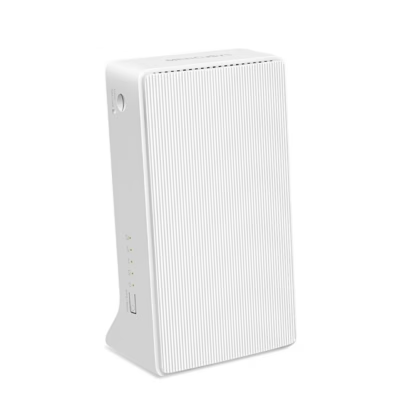
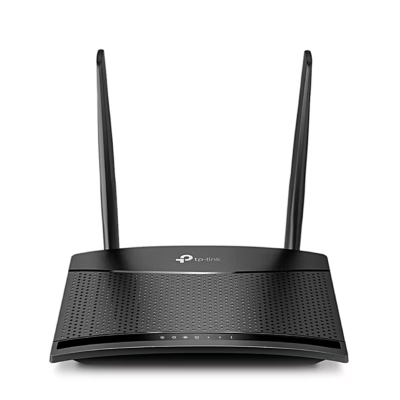
Mercusys MB110-4G white 4G desktop router for a fast and stable internet connection
The Mercusys MB110-4G is a modern white 4G LTE desktop router that provides a reliable internet connection in places where cable connection is lacking or unreliable. Thanks to the 2.4 GHz frequency band, NanoSIM card support and Wi-Fi speeds of up to 300 Mbit/s, this model is well suited for home, office or summer cottage use. Internal antennas and modern security solutions allow up to 32 devices to be connected at the same time and keep the network secure.
Main features
- 4G LTE support: insert a NanoSIM card and use the mobile network to share the internet
- High Wi-Fi data transfer speed of up to 300 Mbit/s (2.4 GHz, Wi-Fi 4 or 802.11n)
- Single frequency band support: suitable for everyday internet and multimedia tasks
- Two LAN ports for connecting wired devices, and an Ethernet WAN option
- Strong security: WPA-PSK, WPA2-PSK, WEP (128/64-bit), firewall, DMZ support, PNAC access control
- Plug and Play: quick and easy setup
- Upgradable firmware
- Works stably on both IPv4 and IPv6 networks
- Wi-Fi Multimedia (WMM/WME) and WPS button for quick connection
- Event log and easy management via the web interface
Technical specifications
- Dimensions: 150.5 × 90 × 92 mm (in box: 210 × 110 × 130 mm)
- Weight: device approx. 710 g (in packaging 475 g)
- Colour: white
- Power supply: DC 9V / 0.85A (adapter included)
- Internal antennas; connectors for external antennas available
- Two Ethernet LAN (RJ-45) ports, 10/100Base-T(X)
- NanoSIM slot (4G LTE Cat 4, LTE-TDD & LTE-FDD): frequencies 700–2600 MHz
- Supports 3G networks: HSPA, UMTS, HSPA+ (850, 900, 2100 MHz)
- Security algorithms: WPA/WPA2-PSK, WEP, firewall, DMZ, PNAC
- Operating temperature: 0–40°C; storage temperature: –40 to +70°C
- Operating humidity: 10–90%, storage conditions: 5–90%
- Indicator lights for connection and device status
- Reset and WPS button
- Package contains: router, power adapter, quick installation guide (packaging: box)
Use and maintenance
Using the Mercusys MB110-4G is simple. Insert a NanoSIM card into the device, connect it to the mains and wait until the LED indicator shows that the connection is ready. If needed, you can connect up to two devices (for example a computer or a TV) with a LAN cable. To set up the Wi-Fi network, use the WPS button or the plug and play interface. Settings and management work via the web interface (for example changing security, network, DHCP or port forwarding).
Maintain the device with a dry cloth, avoid moisture getting inside the device and do not use abrasive cleaning products. In case of problems, use the reset button to restart the device or restore factory settings. If needed, firmware can be updated from the manufacturer’s website.
Why choose the Mercusys MB110-4G 4G desktop router?
This model is suitable for places without a stable cable connection, for example a summer house, the countryside or a temporary office. Thanks to NanoSIM support and wide frequency band coverage, the device works with mobile operators. Plug and Play installation and two LAN ports make the device convenient to use. Security and indicators help ensure trouble-free operation.
Mercusys MB110-4G is a router with a good price-to-quality ratio that provides stable 4G internet anywhere.






















































Reviews
There are no reviews yet.